
A corporate authorization serves as your electronic consent for us to handle your company’s tax-related matters. We will file and pay your VAT returns on your behalf, as well as prepare your business tax returns. If the company authorization is missing, it is not possible to file a return or make a payment.
Please note that this authorization differs from the personal authorizations you granted us during the initial stages of your business name service order. Personal authorizations are required for opening a business ID or retrieving information, whereas company authorizations are required for handling tax-related filings.
Here's how to grant company permissions
1. Go to Suomi.fi service
2. Select " Sign In"

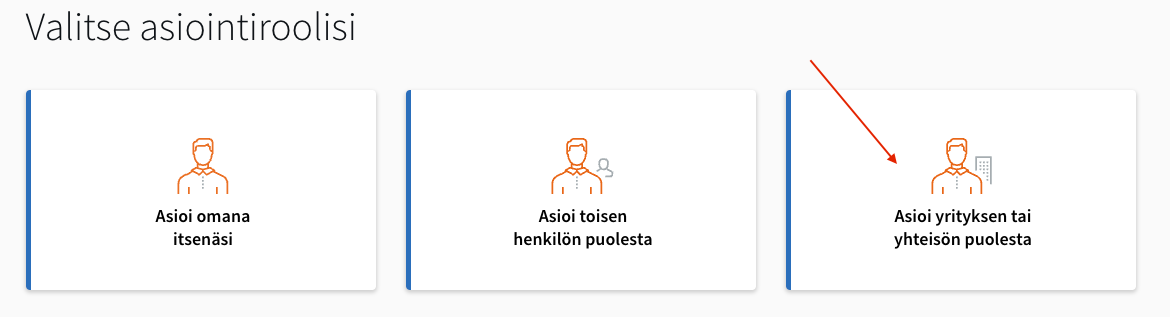
3. Select Act on behalf of a company or organization
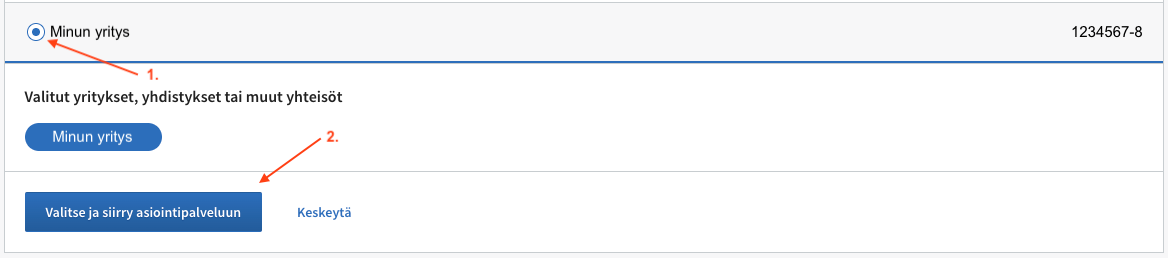
4. Click the selection next to your company name, then click Select and proceed to the online service.
5. Click Proceed to confirmation (1)

6. Click Confirm authorization

Authorization has now been granted. We will receive notification of the authorization automatically within 24 hours.
How do I know if I've granted business permissions?
Open your app and go to "Tax Payment Information" in the menu. If the screen is blank, you do not have the necessary company permissions.
If you just granted authorization a moment ago and the screen is blank, please check again tomorrow. The authorization will be updated in our system within 24 hours of being granted.
Video tutorial
If you find it easier to follow the instructions in a video, you can find our video tutorial here (YouTube).