
In the Pro Light service, we take care of withholding taxes from your invoices. Taxes are withheld according to the percentage you have set in the application. At the end of the year, we will pay the collected taxes to the Tax Administration in one lump sum.
Determining the tax rate
You can estimate the appropriate withholding tax percentage using your own income tax card.
When making your assessment, please note the following:
- Your potential salary income.
- The result of your business activities (income minus expenses).
You can view the company's results in the income statement on the Reports tab of the application. If you find it difficult to estimate the tax rate, you can always ask the Tax Administration for advice.
Setting the tax rate
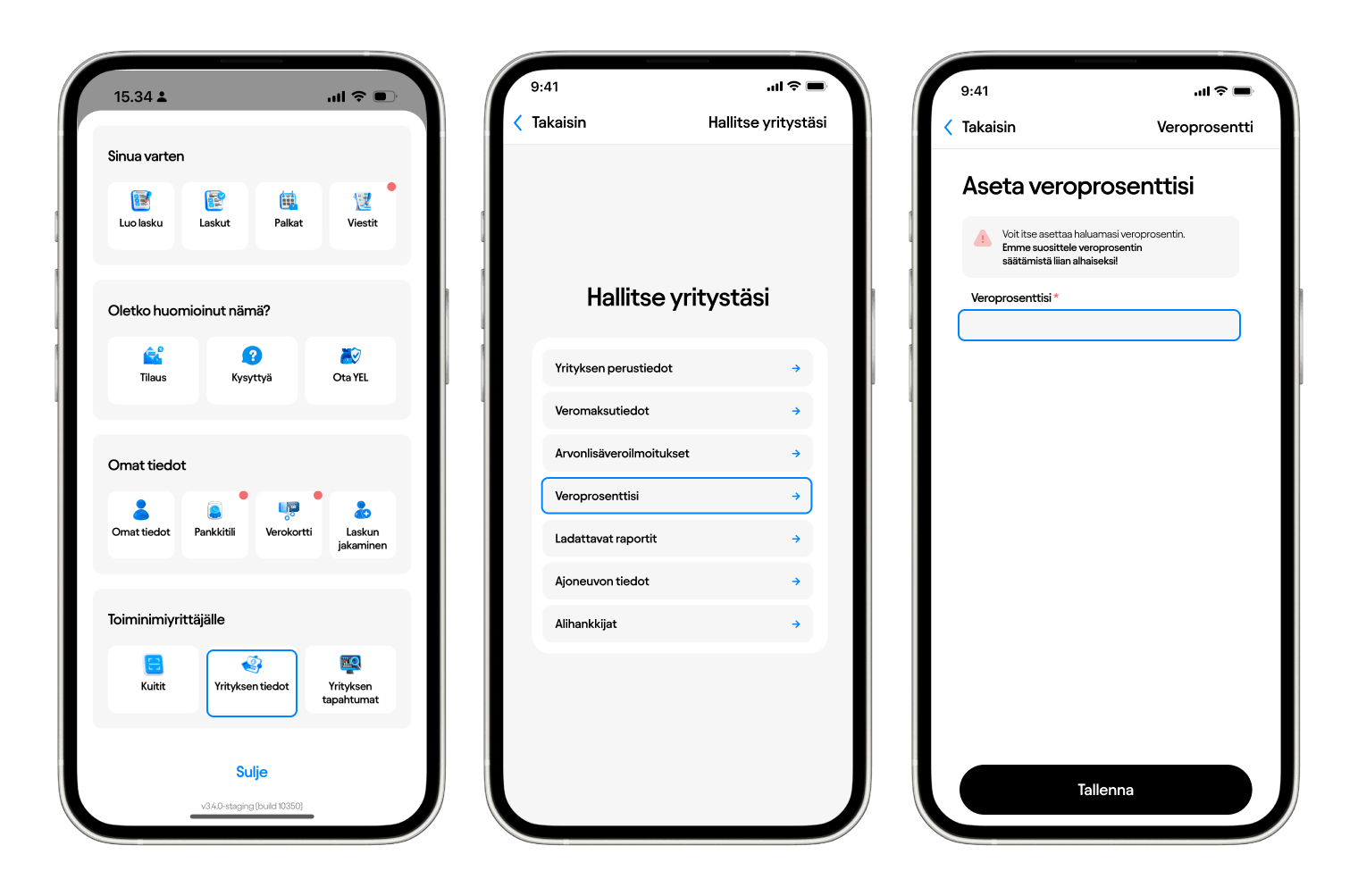
Set the tax rate in the application under: Company information > Tax rate.
If you do not set a tax percentage, no tax will be withheld. You can update the percentage at any time during the year.
If the Tax Administration has assigned prepayment taxes
If the Tax Administration has already imposed advance tax on you, proceed as follows:
- Set the tax rate to 0 in the application.
- You must pay the prepayment taxes assigned by the Tax Administration and shown in OmaVero by the due date.
Please note that we do not set the tax rate for you – you must ensure that it is up to date yourself. You will receive regular reminders by email to keep your tax rate up to date.